S8 Edge Music Player
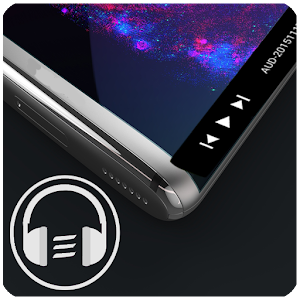
Music player is one of the most accessed Android application, With the edge screen music player, you can add the music player to the edge of your screen and making the music play very easy.
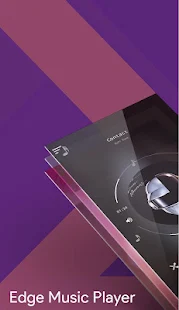
The edge player has a color changing gradients which is the biggest interface innovation in any music player.
The music player also has best in the class sound reproducing capacity, it is much clear and louder when compared to other apps.
The Music player provides you two modes, a lightweight mode in which a music player sits at the edge of your screen and can be opened with just a swipe on the edge of the screen and a complete music player with the best in class features.
Whenever you need the edge music player, you need to switch it on from the app.
The user interface is made simple and understandable, to provide dynamism to the app, the UI changes according to album art of the song.
You can adjust the triggering area of the app which provides the added flexibility required for apps like this.
With instant share feature, you can share your favorite song with all the apps available in your phone making the sharing of songs very easily.
The interface is designed to change colors frequently to make it look attractive.
App features
~A lightweight music player which can be summoned by a swipe on the edge of your screen.
~A lightweight player has the options to select, play and pause a song.
~All the songs are presented in a divided manner, division takes place along the dimensions of album and artist.
~Add your favorite songs to the playlist and listen to them whenever you require.
~share your favorite songs from the app itself.
~Use sleep timer and set the time when you need music to stop automatically.
~You can search lyrics online for thousands of songs.
~A ringtone cutter with an option of saving the ringtone as music or ringtone tunes, you can convert and cut any music to make it as a ringtone.
~Aritist images will be downloaded automatically from the internet.
~There are two different views for an album, artist.
~last and most important thing is, it has a beautiful interface with changing gradients.
we have taken a lot of time and has developed this, we would be very happy to receive reviews from your side, if you have any suggestions please do write to us at
Edgeplayerapp@gmail.com, we will reply you.
This is a free version (ads included), if u want to help us, please give us a 5-star rating and a nice review.
The music player was exclusively designed for galaxy s8 devices at the beginning, with seeing the problem in other devices, the app is made available to all the devices and has been designed in such a way that the music player can be run on any devices hence making playing music very easy in every device.
The infinity display in galaxy s8 given you the best look for the music player, Galaxy s7 edge also gives out one nice look for the edge player.
The music player can be used with any devices, Special care has been taken for the Samsung devices to make equalizer accessible so that Galaxy S8 and Galaxy S7 has no problem playing songs.
Give all the required permission in Galaxy s8 ,Galaxy s7 and moto devices for the edge player to work properly.
Give all the required permission in Galaxy s8 ,Galaxy s7 and moto devices for the edge player to work properly.
https://goo.gl/ww2GX3
Music player is one of the most accessed Android application, With the edge screen music player, you can add the music player to the edge of your screen and making the music play very easy.
The edge player has a color changing gradients which is the biggest interface innovation in any music player.
The music player also has best in the class sound reproducing capacity, it is much clear and louder when compared to other apps.
The Music player provides you two modes, a lightweight mode in which a music player sits at the edge of your screen and can be opened with just a swipe on the edge of the screen and a complete music player with the best in class features.
Whenever you need the edge music player, you need to switch it on from the app.
The user interface is made simple and understandable, to provide dynamism to the app, the UI changes according to album art of the song.
You can adjust the triggering area of the app which provides the added flexibility required for apps like this.
With instant share feature, you can share your favorite song with all the apps available in your phone making the sharing of songs very easily.
The interface is designed to change colors frequently to make it look attractive.
App features
~A lightweight music player which can be summoned by a swipe on the edge of your screen.
~A lightweight player has the options to select, play and pause a song.
~All the songs are presented in a divided manner, division takes place along the dimensions of album and artist.
~Add your favorite songs to the playlist and listen to them whenever you require.
~share your favorite songs from the app itself.
~Use sleep timer and set the time when you need music to stop automatically.
~You can search lyrics online for thousands of songs.
~A ringtone cutter with an option of saving the ringtone as music or ringtone tunes, you can convert and cut any music to make it as a ringtone.
~Aritist images will be downloaded automatically from the internet.
~There are two different views for an album, artist.
~last and most important thing is, it has a beautiful interface with changing gradients.
we have taken a lot of time and has developed this, we would be very happy to receive reviews from your side, if you have any suggestions please do write to us at
Edgeplayerapp@gmail.com, we will reply you.
This is a free version (ads included), if u want to help us, please give us a 5-star rating and a nice review.
The music player was exclusively designed for galaxy s8 devices at the beginning, with seeing the problem in other devices, the app is made available to all the devices and has been designed in such a way that the music player can be run on any devices hence making playing music very easy in every device.
The infinity display in galaxy s8 given you the best look for the music player, Galaxy s7 edge also gives out one nice look for the edge player.
The music player can be used with any devices, Special care has been taken for the Samsung devices to make equalizer accessible so that Galaxy S8 and Galaxy S7 has no problem playing songs.
Give all the required permission in Galaxy s8 ,Galaxy s7 and moto devices for the edge player to work properly.
Give all the required permission in Galaxy s8 ,Galaxy s7 and moto devices for the edge player to work properly.
https://goo.gl/ww2GX3